



 Written by Shlomit Malka
10/07/2026
5 min
Independent, Not Alone
For a few days I was convinced there was a hive inside my thyme plant. What I found instead changed…

Contract Sharing puts your contract in front of your Collaborator instantly · by link, email, or SMS. No account on their end, no app to download.
Share from the contract itself. Your Collaborator opens a polished document on any device: your services as line items, the payment schedule, and terms in universal legal language their lawyer or accountant recognizes. They review, sign, and pay from the same link, and every step logs to the contract’s Timeline on your side.
Deals lose momentum in the gap between “yes” and “signed.” Cutting that gap to one tap · in the channel your Collaborator already uses · is how agreements close while the enthusiasm is still warm.
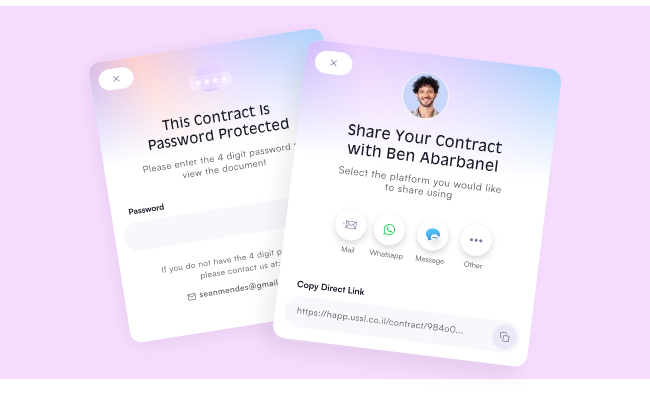
For every Creator who needs their contracts seen, reviewed, and signed — fast.
Everything you need to get your contract in front of the right people.
Add your services, payment structure, and legal terms - choose a skin that fits your brand.
Send the contract link via email or SMS directly from Happ - or copy and send it yourself.
Your Collaborator opens on any device - no account needed - and reads through the terms.
They sign digitally - Happ captures their signature, timestamp, and IP. The contract locks immediately.
You get an instant notification and the signed contract is stored permanently in Happ.
From built to signed — without leaving Happ.
A walkthrough of the client side of a Happ contract · what the shared document contains, why terms appear in Freelancer/Client legal language, how signing flips the status band and…
Shlomit Malka
Contract Sharing lets you send any Happ contract to your Collaborator via link, email, or SMS — they open it on any device, review it, and sign without ever creating an account. The whole flow happens inside Happ, with real-time status tracking from sent to signed.
PDFs get downloaded, lost in email threads, opened on the wrong device, and require your Collaborator to figure out how to sign and return them. Contract Sharing sends a live link that opens beautifully on any phone, laptop, or tablet — your Collaborator signs in one tap, and you get notified the moment they do.
No. Collaborators receive a unique link and can review and sign from any device without creating an account. Zero friction, maximum signing rate.
All of the above. Send the contract directly from Happ via email or SMS, or copy the link and share it through WhatsApp, iMessage, Slack, or any channel you already use. The link works the same everywhere.
Yes. You can share a view-only version of the contract with anyone who needs to see it — an agent, accountant, studio, or manager — without giving them signing access. Visibility without authority.
The contract locks immediately — no further edits by either party. Both parties receive a signed copy stored permanently in Happ, with a full audit trail (who signed, when, from where). You're protected and so is your Collaborator.
Yes. Contract skins are visual design themes for the contract document — choose from a range of aesthetics that match your brand. Your Collaborator receives a professionally designed contract, not a plain PDF, which signals seriousness from the first impression.
No. Your Collaborator opens the contract directly in their browser — no app install, no PDF reader, no account creation. They can sign from their phone in under a minute.
USD Free · $20/month Pro — Contract Sharing is available on every Happ plan · fees are identical on every plan.
Tips for getting contracts signed faster.

 Written by