



 Written by Shlomit Malka
10/07/2026
5 min
Independent, Not Alone
For a few days I was convinced there was a hive inside my thyme plant. What I found instead changed…

Invoicing on Happ is automatic financial record-keeping: every completed milestone generates a record, and invoices and receipts are generated from the contract itself · searchable, exportable, always current.
Send an invoice or receipt from any contract or contact profile in two taps. Because documents are generated from the contract’s own line items and payment records, the numbers always match what was agreed and what was paid. Offline payments can be recorded too, so the ledger tells the whole story.
Clean records are the quiet backbone of a professional business · faster bookkeeping, smoother tax seasons, and documents that hold up when a Collaborator’s accountant comes asking. Your finances end up as organized as your work.
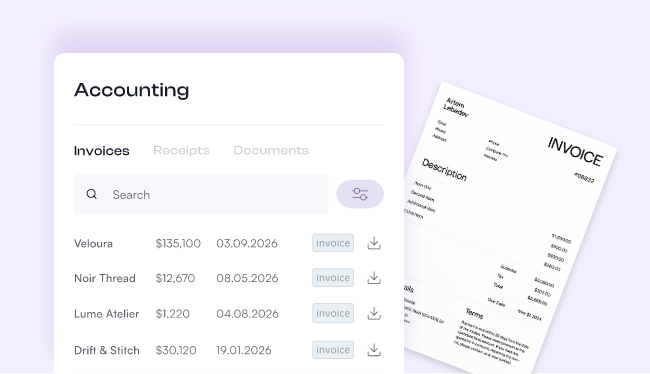
For every Creator who wants their finances to look as professional as their work.
Everything you need to send, track, and report on your income.
Add your services and payment structure - your contract is the source of truth for every invoice that follows.
When a milestone is due, Happ generates the invoice automatically - no manual creation needed.
Your Collaborator receives the invoice, pays, and the status updates in real time.
Once payment is confirmed, a receipt is generated for both parties and recorded in your Accounting tab.
Head to the Accounting tab, set your date range, and export a CSV - your full income history in seconds.
Your finances, as organized as your creative work.
How to send invoices, receipts, and refunds on happ · starting from the payment itself, how Invoice and Request open the same three-step wizard (Payments, Document, Share), bundling open payments…
Shlomit Malka
Invoicing on Happ generates an invoice for every milestone and a receipt for every payment automatically — pulled directly from your contracts. Everything lives in your Accounting tab: searchable, filterable by document type, and exportable as a CSV any time.
Manual invoicing means rebuilding the same document over and over, copying details from email threads, and hoping you didn't typo a number. Happ Invoicing generates the invoice from your contract automatically — every line item, every milestone, every detail — with no manual entry and no risk of mismatched data between your contract and your invoice.
Yes. Every invoice and receipt lives in your Accounting tab — organized, searchable, and exportable. When tax season hits, set a date range and download a CSV of your full transaction history in seconds. Your accountant will thank you.
Yes. When a milestone is due, Happ generates the invoice automatically. When the payment is confirmed, a receipt is generated automatically. You don't create either one manually — they appear as you work.
Yes. Search by client name, invoice number, or date — and filter by document type (Invoices or Receipts) in the Accounting tab. Find any document in seconds, no matter how many Collaborations you've completed.
An invoice is a request for payment — sent before the Collaborator pays. A receipt is a record of a completed payment — generated automatically after the transaction is confirmed. Both are stored permanently in your Accounting tab.
Yes. In the Accounting tab, set any date range and export a CSV of all your transactions — invoices and receipts included. Send it directly to your accountant or archive it for your own records.
No. Happ Invoicing covers contract-based invoicing, receipts, payment tracking, and CSV export for tax filing — the core of what most independent Creators need. For complex bookkeeping, you can hand the CSV to your accountant or import it into your accounting software of choice.
USD Free · $20/month Pro — Invoicing is available on every Happ plan · fees are identical on every plan.
Tips for keeping your finances clean all year.

 Written by