
How to Set Up Your Happ.Me Card (and Turn It Into Work)

Your Happ.Me Card is your public creator card · one link, one QR code, one "Work with me" button that routes straight into your Homebase. Here's how to set it up and put it to work.
Duration: 5 minutes
Updated: 20/07/2026
How to Set Up Your Happ.Me Card (and Turn It Into Work)

Tools

  • Happ account on the Pro plan (app.happ.network)
  • The places you're already discovered: Instagram bio, email signature, portfolio

Ingredients

  • An active Pro plan (the Happ.Me Card is a Pro feature)
  • One specific line describing what you do
  • Five minutes

At a glance

  1. Open your card Your card already exists · it just needs your attention. It opens from the QR icon at the top right of the Activity screen.
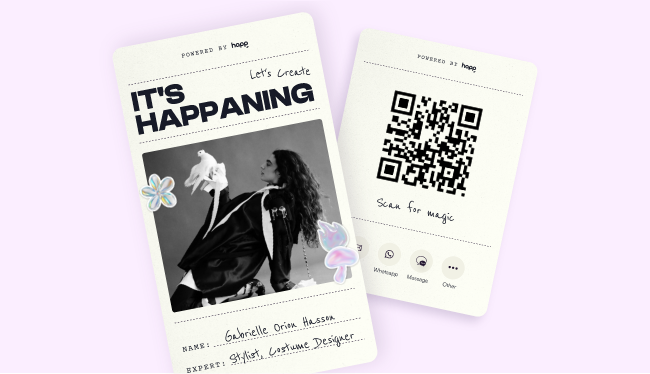
    Tap the QR icon at the top right of your Activity screen. That opens your shareable Happ.Me Card · your public creator card at app.happ.network/me/[your-handle], with happ.me as the short domain that points to it. What's on it: your name, your expertise line, a "Let's Create" invitation, and the Work with me call to action. It says who you are and what you do, then gets out of the way.
  2. Sharpen your expertise line This is the one line a potential Collaborator reads before deciding to reach out. Make it work.
    Be specific. "Portrait & brand photographer, NYC" works harder than "Creative." A good expertise line answers two questions in under ten words: what do you do, and for whom? A quick test: if someone read only this line, would they know whether to hire you? If the answer is "sort of," tighten it. Discipline plus specialty plus city is a reliable formula.
  3. Put the link where discovery happens Happ is not where people discover you · it's where the relationship becomes a working one. The card is the bridge between the two.
    Place your card link in the three spots where new people already find you:
    • Instagram bio · the highest-traffic surface for most creatives
    • Email signature · every professional email becomes a quiet referral
    • Portfolio footer · the person who just scrolled your work is the warmest lead you have
    The point isn't more places · it's the right ones. Wherever someone decides they want to work with you, the next tap should land on your card.
  4. Use the QR code in the room The QR icon on your Activity screen is built for in-person moments: shoots, shows, Happenings, that conversation at the end of an event.
    Someone scans, lands on your card, taps Work with me · and the follow-up already lives in your Homebase instead of a stack of paper cards. This is the move for the moments paper cards were invented for: end of a shoot, after a show, mid-conversation at a Happening. No spelling out your handle, no "I'll DM you." One scan and the connection is real.
  5. Turn Work with me taps into contracts The tap is the beginning. Here's the short path from inquiry to signed agreement.
    When someone taps Work with me, you're notified immediately · ahead of everything else in the app. From there:
    1. Add them to your Contacts so the relationship has a record from day one.
    2. Open a New Contract and set them as the Collaborator.
    3. Let Happ AI help you shape services and terms, review, and send.
    Inquiry to signed agreement, without leaving the app. The faster the first contract goes out, the more the card earns its place in your bio.

Frequently Asked Questions

Is the Happ.Me Card free?

The Happ.Me Card is a Pro feature, included in the Pro plan at $20/month. Verify current plans at happ.network.

What's my card's address?

Your card lives at app.happ.network/me/[your-handle]. The short domain happ.me points to it · easier to say out loud and cleaner in a bio.

Does the card replace my portfolio?

No. Your portfolio shows the work; the card converts the interest. Keep both, and link the card from the portfolio so the person who just fell for your work has one tap to start a Collaboration.

What happens when someone taps Work with me?

You get notified immediately · Work with me inquiries are treated as the highest-priority notification in the system. From the notification, the natural next steps are adding them to Contacts and opening a New Contract.

Why the Happ.Me Card exists

Most link-in-bio pages point outward. Your Happ.Me Card points inward · straight into your business. It lives at app.happ.network/me/[your-handle], with happ.me as the short domain, and it carries one action that matters: Work with me.

  • When someone taps Work with me, that inquiry becomes the highest-priority notification in your Happ account. A lead, at the top of your stack.
  • The card is deliberately minimal: your name, your expertise line, a “Let’s Create” invitation, and the call to action. No feed to maintain, no grid to curate.
  • The Happ.Me Card is a Pro feature.