
What Your Client Sees When You Send a Contract on Happ

Before you send your first contract on Happ, see the deal from the other side: what your client receives, how signing works, and how they pay.
Duration: 7 minutes
Updated: 20/07/2026
What Your Client Sees When You Send a Contract on Happ

Tools

  • Happ account (app.happ.network)
  • A contract ready to share, or the New Contract wizard

Ingredients

  • A completed contract: Collaborator, services, payment schedule, terms
  • Your client's preferred payment method, if you know it
  • Two minutes to preview before sending

At a glance

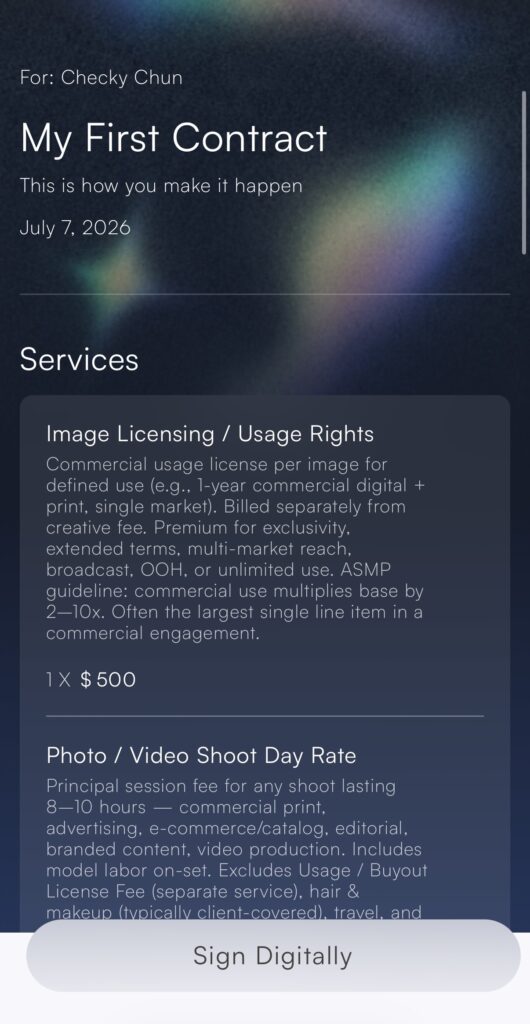
  1. What arrives on their side A polished document, not a login wall. Everything you built in the wizard, presented cleanly.
    When you share a contract, your client receives a document carrying the visual theme you chose, the subject and description, the services as line items with quantities and prices, the payment schedule, and your terms. They can read, sign, and pay from any device · no account to create, no app to download.
  2. Why the terms say Freelancer and Client A contract should read like a contract · in words their lawyer or accountant recognizes.
    Terms in Happ contracts appear in universal legal language: Freelancer and Client. This is deliberate. The document your client's counsel or bookkeeper reviews uses the vocabulary they expect from any professional agreement · which makes it faster to approve and stronger if it's ever tested.
  3. How signing works They review and sign directly from the shared contract. You see it the moment it happens.
    Your client reviews and signs from the shared contract itself. The moment they do, the status band flips to Signed on your side, and the Timeline logs it with a date. No printing, no scanning, no "did you get my email." You'll see exactly where the deal stands every time you open the contract.
  4. How paying works Payment follows what you set in the wizard: a single payment or milestones, online or recorded offline.
    How they pay follows your Payments step:
    • Online · if enabled, they can pay by bank transfer (ACH) or card, directly against the contract.
    • Offline · if accepted, they settle outside the app and you record it, with the Payment Notes field holding the context.
    • Milestones · show with status dots, so both sides read the same picture: what's paid, what's next, what's left.
  5. Read the Timeline as the deal moves Every client action lands as a dated log entry. You're never guessing, and neither are they.
    Every step your client takes · received, signed, partially paid, complete · lands in the contract's Timeline as a dated log: Sent, Signed, Partial Paid, Complete Paid. A deal both sides can see is a deal that moves. And if a payment ever goes overdue, the Timeline is your clean, dated record of exactly what was agreed and when.

Frequently Asked Questions

Does my client need a Happ account?

No. The contract arrives as a link they can open on any device. They review, sign, and pay without creating an account or downloading anything.

Why don't the terms use Happ's Creator and Collaborator language?

Contract terms intentionally use Freelancer and Client · universal legal vocabulary that lawyers and accountants recognize. Inside the app you'll see Happ's own language; inside the legal document, the words are the ones that hold up.

Can my client pay by bank transfer?

Yes, if you enabled online payments on the contract. ACH bank transfer and card are both available, and ACH is usually the cheaper rail for larger amounts.

What do I see when my client takes an action?

The status band updates (for example, to Signed, with the payment status alongside it), and the Timeline logs the event with a date. Signing and payment activity reaches you as it happens.

The other side of the send button

The most common question before a Creator sends their first contract on Happ isn’t about their own screen. It’s about the other one: what does my client actually see? Short answer: a clear, professional agreement they can read, sign, and pay · without creating anything or downloading an app.


  • The contract arrives as a polished document with your services, schedule, and terms.
  • Terms use universal legal language · Freelancer and Client · that their lawyer or accountant recognizes.
  • Every step they take lands in the contract’s Timeline as a dated log on your side.